Source Code Documentation
Graphical User Interface (GUI)
GUI/GUI_functions
- GUI.GUI_functions.import_GUI_input_values_json() dict[source]
Function to import GUI settings from an existing json file and save it as a dict.
- Parameters:
json_file_path (str) – file name to the underlying json with input values for all GUI pages
- Returns:
GUI_settings_cache_dict_reload (dict) - exported dict from json file including a (sub)dict for every GUI page
- GUI.GUI_functions.short_result_interactive_dia(result_path_results: str, session_state_name: str, title: str) None[source]
Function to create interactive results.
- Parameters:
result_path_results (str) – path to a result results.csv file
session_state_name (str) – string of the streamlit session state in which the interactive results diagram whill be stored
title (str) – title of the diagram created within this method
GUI/input_masks/kalman_filter_inputs
- GUI.input_masks.kalman_filter_inputs.calculate_wse_chis(results: dict, network: pandapowerNet) None[source]
Input mask for the calculation of weighted squared error and the hypothesis test using chi-squared distribution.
- Parameters:
results (dict) – dictionary holding the kalman filter simulation result
network (pandapower.pandapowerNet) – pandapower network instance representing the investigated power system
- GUI.input_masks.kalman_filter_inputs.define_kalman_filter_matrices(network: pandapowerNet, measurement_data: str, vts: str) None[source]
Input mask for the creation process of the kalman filter needed matrices.
- Parameters:
network (pandapower.pandapowerNet) – pandapower network instance representing the investigated power system
measurement_data (str) – str of the path where the investigated measurement data is stored
vts (str) – user input string of measured voltages
- GUI.input_masks.kalman_filter_inputs.kalman_filter_plot(network: pandapowerNet)[source]
Streamlit GUI Side bar components for plotting Kalman Filter power systems.
- Parameters:
network (pandapower.pandapowerNet) – Pandapower Network instance holding the power system data
- Returns:
cts (str) - user input string holding the inserted ct data vts (str) - user input string holding the inserted vt data
GUI/input_masks/pandapower_projects
- GUI.input_masks.pandapower_projects.convert_pf_pandapower(app_path: str, project_name: str) None[source]
Input mask for the conversion of a power factory pfd file to a pandapower network instance.
- Parameters:
app_path (str) – path of the power factory executable
project_name (str) – power factory project name
- GUI.input_masks.pandapower_projects.import_pandapower_model() pandapowerNet[source]
Input mask for the import of a pandapower network stored in a JSON file.
- Returns:
network (pandapower.pandapowerNet) - pandapower network instance
GUI/input_masks/pf_project_attributes
- GUI.input_masks.pf_project_attributes.get_powersystem_components_gui(app_path: str, project_name: str) str[source]
Input mask to show a user chosen amount of power system components.
- Parameters:
app_path (str) – power factory executable path
project_name (str) – name of the investigated power factory project
- Returns:
- (str) - boolean for distinction if the component table is shown or not
GUI/input_masks/pf_simulation
- GUI.input_masks.pf_simulation.create_shc_and_run_emt_gui(app_path: str, project_name: str) None[source]
Input mask to add a shc event to the upcoming emt simulation and run the emt simulation afterwards.
- Parameters:
app_path (str) – power factory executable path
project_name (str) – name of the investigated power factory project
Application
Application.PowerFactory
- class Application.PowerFactory.PowerFactory(path)[source]
Bases:
objectPowerFactory Main Class.
author: IB
- activate_project(project_name: str)[source]
Open Project.
TODO: Error Handling if inserted project name does not exist
TODO: Get Return Type
- Parameters:
project_name (str) – power factory project name
- Returns:
- (?) - powerfactory active project
- get_user()[source]
Get current user.
- Returns:
- (powerfactory.DataObject) - application user instance
- open_app(project_name: str)[source]
Open PowerFactory Application and activate project.
TODO: Problem when importing powerfactory module, if several PowerFactory versions in sys.path! Import should be @toplevel.
TODO: Errorhandling if PowerFactory cannot be imported.
- Parameters:
project_name (str) – power factory project name
- Returns:
- (?) - powerfactory application instance
Application.emt_simulation
- class Application.emt_simulation.SimulationEMT(app)[source]
Bases:
objectPowerFactory EMT Simulation Class.
author: Ilya Burlakin, Elisabeth Scheiner
- add_load_event(obj: object, event_time: float = 0.0, event_type: int = 0, load_dp: float = 0.0, load_dq: float = 0.0) None[source]
Add Load Event and set event settings.
TODO: Handling if object is not a Load.
TODO: check type of obj
- Parameters:
obj (object) – powerfactory object to attach the load event to
event_time (float) – time at which the event occurs
event_time – time at which the event occurs
event_type (int) – integer representing the event type of the simulated load change. Possible entries: 0: Step, 1: Ramp
load_dp (float) – relative change of the active power of the by the event effected load
load_dq (float) – relative change of the reactive power of the by the event effected load
- add_shc_event(obj: object, event_time: float = 0.0, fault_location: float = 50.0, fault_type: int = 0, fault_impedance_r: float = 0.0, fault_impedance_x: float = 0.0) None[source]
Add Short-Circuit Event and set fault settings.
TODO: Handling if object is a Load.
TODO: check type of obj
- Parameters:
obj (object) – powerfactory object to attach the shc event to
event_time (float) – time at which the event occurs
fault_location (float) – relative position of the fault location on a powersystem object (e.g. overheadline)
fault_type (int) – integer representing the fault type of the simulated short circuit. Possible entries: 0: 3ph, 1: 2phwoG, 2: 1phG, 3: 2phG, 4: clear fault
fault_impedance_r (float) – resistance of the power system fault
fault_impedance_x (float) – reactance of the power system fault
- add_variables(objects: list[object], attributes: list[str]) None[source]
Add Variables to result file
- Parameters:
objects (list[object]) – List of power factory objects to be considered in the creation of the result file
attributes (list[str]) – List of attributes of the entered power factory objects to be attached to the result file
- clear(events: bool = True, results: bool = True) None[source]
Clear simulation objects.
TODO: define events and results if events, results is None
- Parameters:
events (bool) – decision if the power system simulation contains events
results (bool) – decision if the power system simulation results will be cleared
- export_to_csv(file_name: str) bool[source]
Export simulation results as csv files. Return True if successful.
- Parameters:
file_name (str) – Name of the csv file created within this method
- Returns:
- (bool) - bool representing the exit status of the result file creation process
- inc_settings(verify_inc: bool = True, step_size: float = 0.01, start_time: float = -0.1, synch: bool = True) None[source]
Set initial condition settings of the emt simulation.
TODO: Extend settings.
TODO: Add Loadflow
- Parameters:
verify_inc (bool) – bool indicating if the inserted initial conditions shall be checked or not
step_size (float) – float holding the temporal resolution of time emt simulation to be run later
start_time (float) – start point of the simulation in seconds
synch (bool) – bool indicating if the simulation results shall be recorded synchronized
- init_emt(inc: bool = True, sim: bool = True, events: bool = True, results: bool = True) None[source]
Initialize EMT simulation.
TODO: Handling for creating new result files.
TODO: Handling if Language is set to German.
- Parameters:
inc (bool) – decision if the initial conditions of the emt model have to be set
sim (bool) – decision if the simulation parameters of the emt model have to be set
events (bool) – decision if there are events in the power system simulation
results (bool) – decision if the result data structure will be stored or not
- static load_event_settings(event: object, event_time: float, event_type: int, load_dp: float, load_dq: float) None[source]
Set Single Load event settings.
TODO: Extend fault settings and put parameters in dict, add ramp event.
TODO: check event type
- Parameters:
event (object) – powerfactory event object to be modified
event_time (float) – time at which the event occurs
event_type (int) – integer representing the event type of the simulated load change. Possible entries: 0: Step, 1: Ramp
load_dp (float) – relative change of the active power of the by the event effected load
load_dq (float) – relative change of the reactive power of the by the event effected load
- run() int[source]
Run RMS Simulation. Return 1 if RMS Simulation is successful.
TODO: Add Error Handling, if inc/sim are not defined or init-errors.
- Returns:
- (int) - integer representing the exit status of the simulation run
- static shc_settings(event: object, event_time: float, fault_location: float, fault_type: int, fault_impedance_r: float, fault_impedance_x: float) None[source]
Set Short-Circuit event settings.
TODO: Extend fault settings and put parameters in dict, check if obj is bus (fault_location)
TODO: check type of event object
- Parameters:
event (object) – powerfactory event object to be modified
event_time (float) – time at which the event occurs
fault_location (float) – relative position of the fault location on a powersystem object (e.g. overheadline)
fault_type (int) – integer representing the fault type of the simulated short circuit. Possible entries: 0: 3ph, 1: 2phwoG, 2: 1phG, 3: 2phG, 4 clear fault
fault_impedance_r (float) – resistance of the power system fault
fault_impedance_x (float) – reactance of the power system fault
Application.initialization_powerfactory
- Application.initialization_powerfactory.add_shc_and_run_emt(app_path: str, project_name: str, shc_args: dict, sim_args: dict) None[source]
In this method, the preparations for an EMT simulation are first made before an EMT simulation is carried out and the results are then exported as a CSV.
For this purpose, an instance of the SimulationEMT class is created. A short circuit event is then added to this and the measured values to be recorded are transferred. Finally, the temporal resolution of the simulation is defined and the simulation is carried out.
- Parameters:
app_path (str) – path to the powerfactory executable files
project_name (str) – name of the investigated powerfactory project
shc_args (dict) – dictionary holding the parameter of the investigated short circuit event (e.g. the fault type)
sim_args (dict) – dictionary holding the temporal attributes of the EMT simulation (e.g. the step size)
- Application.initialization_powerfactory.convert_model(app_path: str, project_name: str) None[source]
Method to convert the power system data of the power factory model file (.pfd) to a pandapower loadable JSON File.
- Parameters:
app_path (str) – path to the power factory executable files
project_name (str) – name of the investigated power factory project
- Application.initialization_powerfactory.get_power_system_objects(app, obj_class: str) dict[source]
Getter method for all obj_class objects of the power system.
- Parameters:
app (powerfactory.Application) – active instance of power factory application
obj_class (str) – str defining the power system components class
- Returns:
return_dict (dict) - dictionary containing the combination of power system object label and its instance
- Application.initialization_powerfactory.get_power_system_objects_for_overview(app_path: str, project_name: str, obj_classes: dict) dict[source]
Getter method for all obj_class objects of the power system to create the overview table in the GUI.
- Parameters:
app_path (str) – path to the power factory executable files
project_name (str) – name of the investigated power factory project
obj_classes (dict) – dictionary defining the power system components classes
- Returns:
return_dict (dict) - dictionary containing the combination of obj_class and a list of the label of its instances
Application.kalman_filter
- Application.kalman_filter.array_from_measurement_data(measurement_df: ~pandas.core.frame.DataFrame, measured_nodes: list, network: ~pandapower.auxiliary.pandapowerNet) -> (<class 'numpy.ndarray'>, <class 'numpy.ndarray'>)[source]
Converts the measurement data exported from powerfactory from their RST Form into Alpha, Beta, 0 Form using the clarke transformation.
TODO: currently the label of voltage transformer can only be the german one “Spannungswandler”
- Parameters:
measurement_df (pandas.DataFrame) – Dataframe containing the measurement data exported from powerfactory
measured_nodes (list) – List of the considered buses labels e.g. [5, 7]
network (pandapower.pandapowerNet) – pandapower network instance representing the investigated power system
- Returns:
measurement_u (numpy.ndarray): Containing the Alpha Beta Form of the powerfactory current measurement data
measurement_y (numpy.ndarray): Containing the Alpha Beta Form of the powerfactory voltage measurement data
- Application.kalman_filter.calc_chi2(wse: dict, df: int) dict[source]
Within this method the evaluation of the hypothesis is carried out by evaluating the weighted squared error on the basis of a chi-squared distribution (chi2). The resulting values are return in a dictionary for later visualization.
- Parameters:
wse (dict) – dictionary holding the weighted squared errors foreach timestep calculated before.
df (int) – number of the degrees of freedom (df). In the context of chi2 distributions the df is the number of not tracked state space vector entries vary from 0.
- Returns:
return_dict (dict) - dictionary holding the chi2 result foreach timestep
- Application.kalman_filter.calc_inductance_from_reactance(reactance: float, frequency: float) float[source]
Since the line parameters in Powerfactory consist of impedance and susceptance, the reactance will be converted into a inductance in this method.

- Parameters:
reactance (float) – reactance of the transmission line in ohm
frequency (float) – frequency of the considered power system
- Returns:
capacity (float): calculated capacity of the considered transmission line
- Application.kalman_filter.calc_wse(results: dict, measured_nodes: list, measurement_y: ndarray, network: pandapowerNet, weighting_factor: float) dict[source]
In the Kalman filter protection algorithm, the protection decision is based on a hypothesis test. For this purpose, the difference between the variables measured in the system and the state space vector must be converted to a parameter. This is possible with the help of the weighted squared error (wse), which can then be used to test the hypothesis with a chi2 distribution. In this method, the weighted squared errors (wse) are calculated.
- Parameters:
results (dict) – holding the dictionary of human readable data the state space vector from the kalman filter simulation
measured_nodes (list) – list of the buses where the voltage is measured by a voltage transformer
measurement_y (numpy.ndarray) – measurement vectors of the real signals resulting from the powerfactory simulation
network (pandapower.pandapowerNet) – pandapower network instance representing the investigated power system
weighting_factor (float) – weight factor for the calculation of the weighted squared error
- Returns:
return_dict (dict) - dictionary holding the weighted squared error foreach timestep simulated
- Application.kalman_filter.calculate_system_matrix_A(network: ~pandapower.auxiliary.pandapowerNet, dt: float) -> (<class 'sympy.matrices.dense.MutableDenseMatrix'>, <class 'dict'>)[source]
Main method to create the kalman filter system matrix of a system of overhead lines. Therefore the set of voltage and current differential equations is calculated automatically to avoid creation errors.
- Parameters:
network (pandapower.pandapowerNet) – pandapower network instance representing the investigated power system
dt (float) – temporal resolution of the investigated simulation measurement data
- Returns:
matrix_A (sympy.MutableDenseMatrix) - kalman filter system matrix filled with current and voltage differential equations to represent the state space.
vertice_capacities (dict) - dictionary holding the vertex specific sum of all its connected lines capacities
- Application.kalman_filter.calculate_system_matrix_B(measured_nodes: list, vertice_capacities: dict, rows_A: int, dt: float) MutableDenseMatrix[source]
Main method to create the kalman filter control matrix of a system of overhead lines. Therefore the set of voltage differential equations is completed by adding the term for the extern current influence.
- Parameters:
measured_nodes (list) – list holding all measured nodes
vertice_capacities (dict) – dictionary holding the vertex specific sum of all its connected lines capacities
rows_A (int) – dimension of the previously create system matrix
dt (float) – temporal resolution of the investigated simulation measurement data
- Returns:
matrix_B (sympy.MutableDenseMatrix) - kalman filter control matrix of the considered power system
- Application.kalman_filter.calculate_system_matrix_H(measured_nodes: list, rows_A: int) MutableDenseMatrix[source]
Main method to create the kalman filter observation matrix of a system of overhead lines. Therefore measured nodes are evaluated and their corresponding matrix cells are set to one.
- Parameters:
measured_nodes (list) – list of nodes where the voltages are measured by voltage transformers
rows_A (int) – dimension of the system matrix
- Returns:
matrix_H (sympy.MutableDenseMatrix) - filled kalman filter observation matrix
- Application.kalman_filter.clarke_transformation(measurement: ~pandas.core.series.Series) -> (<class 'float'>, <class 'float'>)[source]
Transform the RST values to alpha beta 0 values using the clark transformation matrix.
- Parameters:
measurement (pandas.Series) – voltages or currents of a power system measurement in RST
- Returns:
alpha (float) : Alpha component of voltage or current.
beta (float) : Beta component of voltage or current.
- Application.kalman_filter.compute_results(network: pandapowerNet, timestep: int, return_dict: dict, vec_x: ndarray) dict[source]
Method to compute the state space vector to easy interpretable dictionary for easier result visualization.
- Parameters:
network (pandapower.pandapowerNet) – pandapower network instance representing the investigated power system
timestep (int) – currently considered timestep
return_dict (dict) – dictionary holding the result data for later visualization
vec_x (numpy.ndarray) – current iteration step state space vector
- Returns:
return_dict (dict) - dictionary holding the result data for later visualization. Within this method the new entry timestep has been appended.
- Application.kalman_filter.convert_matrices_to_clarke(matrix_A: ~sympy.matrices.dense.MutableDenseMatrix, matrix_B: ~sympy.matrices.dense.MutableDenseMatrix, matrix_H: ~sympy.matrices.dense.MutableDenseMatrix) -> (<class 'numpy.ndarray'>, <class 'numpy.ndarray'>, <class 'numpy.ndarray'>)[source]
Convert discrete kalman matrices to matrices usable with clarke converted signals. Therefore the one line matrices need to be doubled since alpha and beta component of the voltage or current signals need to be represented.
- Parameters:
matrix_A (sympy.MutableDenseMatrix) – Kalman filter system matrix one line representation
matrix_B (sympy.MutableDenseMatrix) – Kalman filter control matrix one line representation
matrix_H (sympy.MutableDenseMatrix) – Kalman filter observation matrix one line representation
- Returns:
matrix_A (numpy.ndarray) - numpy converted kalman filter system matrix for discrete clark transformed measurement data
matrix_B (numpy.ndarray) - numpy converted kalman filter control matrix for discrete clark transformed measurement data
matrix_H (numpy.ndarray) - numpy converted kalman filter observation matrix for discrete clark transformed measurement data
- Application.kalman_filter.current_differential_equations(matrix_A: MutableDenseMatrix, lines: list, edge_resistance: dict, edge_inductance: dict, dt: float, buses: list)[source]
Method to fill in the relevant matrix cells for the current differential equations in the system matrix A. The current differential equation for continuous systems is given by:

thereby v1 represents the sending end which is simply set to the lower bus index and v2 represents the receiving end. The conversion of this equation to a discrete representation by using the euler conversion leads to the following equation.

- Parameters:
matrix_A (sympy.MutuableDenseMatrix) – system matrix of the upcoming kalman filter simulations.
lines (list) – list of all power system lines
edge_resistance (dict) – dictionary holding the edge specific resistance
edge_inductance (dict) – dictionary holding the edge specific inductance
dt (float) – temporal resolution of the investigated measurement data
buses (list) – list of all power system buses
- Returns:
matrix_A (sympy.MutuableDenseMatrix) - power system system matrix for the state space representation now holding the current differential equation information.
- Application.kalman_filter.get_temporal_resolution(measurement_data: str) float[source]
Calculate the temporal resolution of the time series to be considered within the Kalman Filter simulation.
- Parameters:
measurement_data (str) – path where the measurement data is stored. User Input in the streamlit GUI
- Returns:
dt (float) - temporal resolution of the investigated time series
- Application.kalman_filter.get_vertices_parameters(buses: list, lines: list, network: ~pandapower.auxiliary.pandapowerNet) -> (<class 'dict'>, <class 'dict'>, <class 'dict'>)[source]
Method to extract the vertex parameters from the pandapower network instance for easier handling in later kalman filter methods.
- Parameters:
buses (list) – list holding all power system buses
lines (list) – list holding all power system lines
network (pandapower.pandapowerNet) – pandapower network instance of the considered power system
- Returns:
- vertices_capacities (dict): dictionary holding the vertices capacities which are calculate within this method since parallel capacitors of the transmission lines add up in the denominator in the kalman filter matrices.
edges_inductances (dict): dictionary holding the combination of the edge label and its calculated
- inductance.
edges_resistance (dict): dictionary holding the combination of the edge label and its resistance.
- Application.kalman_filter.initialize_matrices(process_covariance_volt: float, process_covariance_curr: float, measurement_covariance: float, dim_x: int, dim_z: int, network: ~pandapower.auxiliary.pandapowerNet) -> (<class 'numpy.ndarray'>, <class 'numpy.ndarray'>, <class 'numpy.ndarray'>, <class 'numpy.ndarray'>)[source]
Method for initializing the matrices representing the system uncertainties.
- Parameters:
process_covariance_volt (float) – Uncertainty of the voltage estimation of the kalman filter
process_covariance_curr (float) – Uncertainty of the current estimation of the kalman filter
measurement_covariance (float) – Uncertainty of the measurement resulting from mean free gaussian noise.
dim_x (int) – dimension of the state space vector of the investigated system
dim_z (int) – dimension of the measurement vector z of the investigated system
network (pandapower.pandapowerNet) – pandapower network instance representing the investigated power system
- Returns:
matrix_P (numpy.ndarray) - kalman filter covariance matrix. Holding dimx x dimx zeros.
matrix_R (numpy.ndarray) - kalman filter measurement noise covariance matrix.
matrix_Q (numpy.ndarray) - kalman filter process noise covariance matrix.
vector_x (numpy.ndarray) - kalman filter state space vector consisting of dimx zeros.
- Application.kalman_filter.run(system_matrices: dict, measurements: dict, kalman_matrices: dict, network: pandapowerNet) dict[source]
Method to start the kalman filter simulation. Therefore all matrices previously calculated are stored in the kalman filter equivalent variables and a iteration over each time step is rolled out.
- Parameters:
system_matrices (dict) – dict holding the kalman filter matrices (A, B and H)
measurements (dict) – dict holding the measurement vectors (u, y)
kalman_matrices (dict) – dict holding the covariance matrices (P, R and Q) as well as the state space vector (x)
network (pandapower.pandapowerNet) – pandapower network instance representing the considered power system
- Returns:
return_dict (dict) - dictionary holding timestep wise extracted kalman filter results
- Application.kalman_filter.translate_current_transformers(cts: str) dict[source]
Since the user input in the GUI is a string list of the considered current transformers (cts) in the investigations, its information needs to be split up and stored separately.
Current transformer input information needs to follow the following scheme:
“<measured bus>: <measured direction>.”
e.g. “bus4: -bus6” means that the current from bus 6 to bus 4 is measured and the direction from bus 6 to bus 4 is measured positive. Removing the minus leads to a conversion of the positive measurement direction.
- Parameters:
cts (str) – String holding the current transformer information inserted by the user in the GUI
- Returns:
ct_translated (dict) - dictionary holding the separated current transformer information
- Application.kalman_filter.translate_voltage_transformers(vts: str) list[source]
Translate the user input string holding the considered vts into their pandapower equivalent index.
- Parameters:
vts (str) – the user input string holding the considered vts
- Returns:
vt_nodes (list) - list of the pandapower indices of the considered vts
- Application.kalman_filter.update_nxgraph(cts: dict, network: ~pandapower.auxiliary.pandapowerNet) -> (<class 'networkx.classes.multigraph.MultiGraph'>, <class 'list'>)[source]
In this method, the network of the power system is cut off at the balancing boundaries and exposed nodes are deleted. This is illustrated in the network graph update. The boundary nodes should become red, for which they must first be collected in the “nodes” data structure.
- Parameters:
cts (dict) – dictionary containing the in the kalman filter consideration necessary current transformer
network (pandapower.pandapowerNet) – Network instance of pandapower module
- Returns:
nxg_network (networkx.MultiGraph) - Updated networkx MultiGraph instance
nodes (list) - List holding the balancing boundary nodes
- Application.kalman_filter.voltage_differential_equations(buses: list, lines: list, vertice_capacities: dict, matrix_A: MutableDenseMatrix, dt: float) MutableDenseMatrix[source]
Method to fill in the relevant matrix cells for the voltage differential equations in the system matrix A. The voltage differential equation for continuous systems is given by:
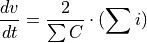
thereby incoming currents are represented by positive entries and outgoing currents are represented by negative entries. The conversion of this equation to a discrete representation by using the euler conversion leads to the following equation.
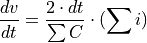
- Parameters:
buses (list) – list of all power system buses
lines (list) – list of all power system lines
vertice_capacities (dict) – dictionary holding the vertex specific sum of all its connected lines capacities
matrix_A (sympy.MutuableDenseMatrix) – system matrix of the upcoming kalman filter simulations. Since the voltage differential equations are the first step of the system matrix creation the system matrix shall consist of zeros.
dt (float) – temporal resolution of the investigated measurement data
- Returns:
matrix_A (sympy.MutuableDenseMatrix) - power system system matrix for the state space representation now holding the voltage differential equation information.
Application.pandapower_model
- Application.pandapower_model.create_nxgraph(network: pandapowerNet)[source]
Method to create a networkx graph of the pandapower network.
TODO check return types
- Parameters:
network (pandapower.pandapowerNet) – pandapower network for which the networkx graph will be created
- Returns:
nxg_network (?) - networkx graph components of the considered network pos (?) - position of the networkx graph components
- Application.pandapower_model.import_pandapower_model_json(json_path: str) pandapowerNet[source]
Import method to load pandapower model from the on windows created JSON File.
- Parameters:
json_path (str) – path to the location of the json file to be imported
- Returns:
- (pandapower.pandapowerNet) - pandapowerNet instance loaded from the json file